I. Introduction:
- For the final project of this course, we get to choose an open source package and try to optimize it
- The first thing that came to my mind is gzip because it’s the equivalent of tar for extracting and compressing archive with gzip format but tar is significantly faster (at least in my experience) so I want to try to improve it
II. Building:
- Firstly, we need to clone the repository of the project and build it
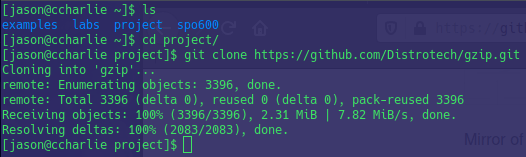
- As written in the INSTALL file within the directory, we need to run a file named configure to install the program. However, the program will be installed at the default location (it can be /usr/bin or /usr/local/bin depends on your distro), to install a local version and avoid messing with the existing program (if there is any), we need to include an option called –prefix=DIR-TO-INSTALL
III. Testing:
- As expected, gzip performs very fast if the given files are too small (below 2gb) so we need to feed it with a larger file
- For the testing purpose, I generated a 5Gb test file and perform gzip and gunzip on 2 servers: ccharlie and xerxes
- The execution time on ccharlie takes a significant amount of time
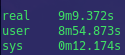
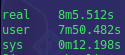
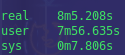
- Surprisingly, the execution time on xerxes is dramatically faster

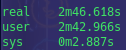

- The above results are collected on ccharlie server, the order of compressing from left to right are: default, -1 and -2
IV. Result:
- Despite having a huge difference between AArch64 and x86-64, the changes in term of time between the compressing levels are similar. I believe the reason is that the AArch64 is relatively new comparing to that of x86-64
- Additionally, the compression time seems to be decreasing as we increase the compressing level
 SPO600