A. Introduction:
Assembly language is a low-level programming language for microprocessors and other programmable devices(Adruino boards, microcontrollers, etc…). However, it is divided into many versions depend on the machine’s architecture. Using Assembly allows programmers to write human-readable code that is almost identical to computer language, it also provides them the freedom to completely control how a program works.
B. In class experiments:
I. LSR(Logical Shift Right):
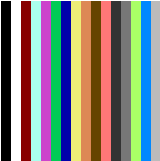
Result: With one [lsr] instruction, each pixel’s color repeated once before changed to the next color
Reason: The instruction [lsr] caused the bit right shift operations, which means divide the binary by 2. As a result, the color is repeated because the value of register A (hold the color code) is devided
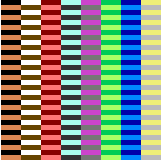
Result: With two [lsr] instruction, each pixel’s color repeated 3 more times before changed to the next color
Reason: Similar to the example with one [lsr], the value of register A (hold the color code) is devided by 2 twice. As a result, the colors are repeated before changing. Identical results would happen as we add more [lsr], the pixels of the same color will be doubled
II. ASL(Arithmetic Shift Left):

Result: The color starts from black and skip the odd number color code
Reasons: In contrast to [lsr], the bits are now shifted to the right which means they are multiplied by 2. The value of color started from 0 which make the first color is black. Then, it is transfer with the value of Y every loop and multiplied by 2. Similar result will happen if we add more [asl] instruction, less color will be displayed because we multiply the value of color (in register A) by 2 twice
C. In class writing:
I. Initialize:

We initalize the pointer to points to 0$200 which is the first pixel
II. Top and Bottom lines:
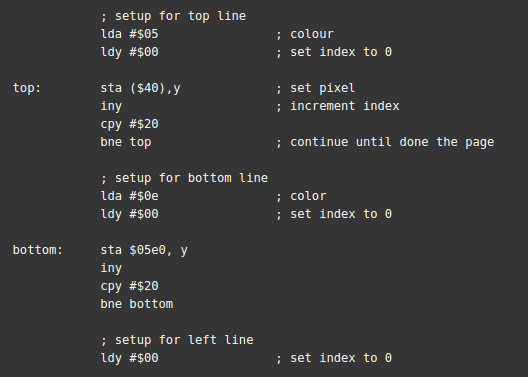
- The top part is setting the pointer the first pixel, then we set the color code of $05 (light green) into register A and set the index to 0
- In the [top] loop, we first store the value of register A (store color) into the memory $40 (the pointer). Then we increase the value of Y to the next pixel. To make sure the pixel doesn’t exceed the first row, we comapre the value of Y to hex code #$20
- As for the [bottom] loop, we change the color to #$0E (light blue) and reset the index in register Y to 0. Then we store the current color in $05E0 which is the first pixel of the last row. The rest is similar to the [top] loop
III. Left and Right lines:
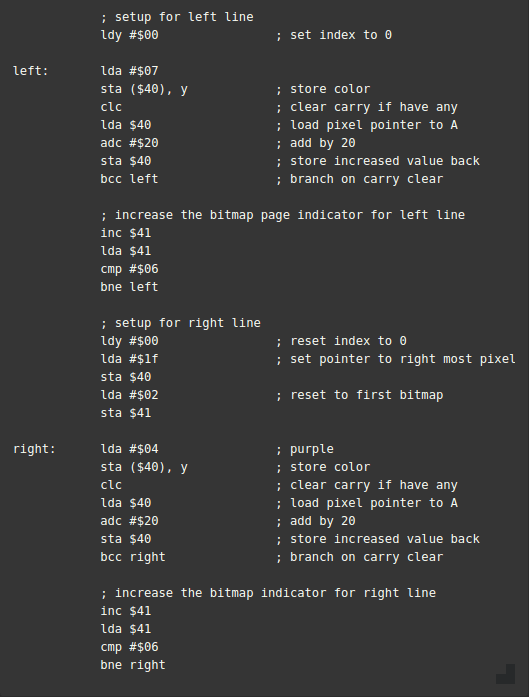
- First, we reset the index back to 0
- In the [left] loop, we first load the color into register A because we will be using the same register to increase the bitmap page so the color will not persist in register A.
- Then, we clear the carry flag if there is any to avoid unwanted color. Next, we load the value stored in memory location $40 (pixel pointer) into register A for addition operation. This addition will increase the location of pointer to the next one in the same columm. Finally, we store the value back to the memory location
- After one bitmap is filled, we need to increase the bitmap page pointer stored in $41. Then we load it into register A and compare with 6 to include all 4 bitmaps
- [Right] loop operates the same way but we have to reset the index (register Y) back to 0 and bitmap page pointer to #02 (first bitmap), change the pixel pointer to the right most pixel.
IV. Result:

After putting all the above code in the 6502 simulator, our bitmap will be similar to the picture on the left
D. Conclusion:
I. First impression:
- The freedom to manipulate registers and the stack is a powerful feature for optimization since we have total control
- Allow programmers to understand how their code is managed by the system. As a result, it is easier to make programs that aim for optimization and enhance it later
- Assembly provides a deeper knowledge of the system functions so it’s easier to debug and write code on top of the system calls
II. Lessons:
- How programs and functions manage parameters and interact with each others
- How to manipulate the hardware for faster and more precise operations
- How programs use flags to communicate and for developers to write logging scripts/programs
- How bits were managed for multiple operations
III. Reflection:
- At the moment, I like assembly as an educational language since it introduces a lot of new insights for me
- Assembly changed how I think about programs and coding, this will help me to write code in a more efficient way

