I. Introduction:
- The project I chose to optimize is Gzip which is a compression utility commonly used to work with archives developed by GNU community
- Personally, there are other projects I’m interested in but I don’t know enough to perform such task so I picked Gzip because it’s simple enough for me to understand
- Additionally, I believe Gzip is one of the default package on most Linux system along with Tar and I’m curious about the efficiency between them

II. Building:
1. Source code:
- Since the package is open source, the source code of the package can be found online via their homepage or any version control tool like Github or Bitbucket
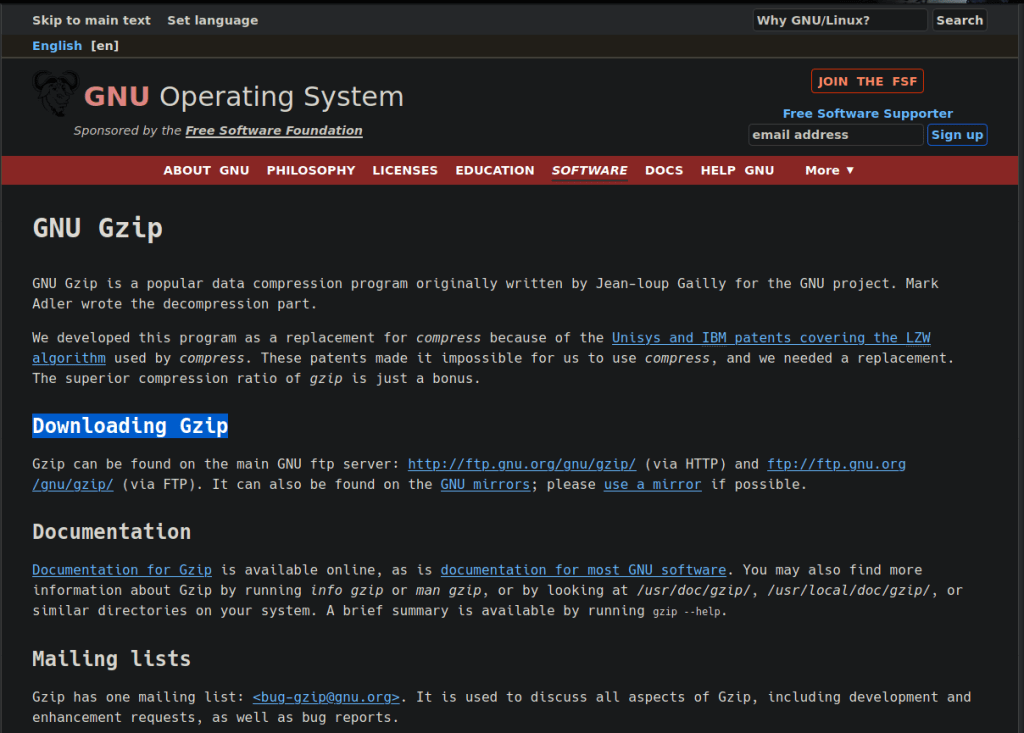
- For starter, I found the source code on the website via their homepage and go to the download section. There are several options to retrieve the program
2. Understanding building process:
- Since we have wget installed on the SPO600 servers, I will be using the HTTP link to download the program via this link
- There are many important files within the directory of the program, but since we are focusing on building for this post, we will be looking at the INSTALL file that provide instruction on building process
- As documented in the file, there are many options and flags you can pass to the configure script to build the program. Since we don’t want to overwrite the gzip package already installed on the system, we will be using the –prefix=/path/to/dir to define the install location for this project
- Additionally, there are several flags you can pass for the C/C++ compiler such as DEBUG flags or optimization level. For the purpose of demonstration, we will be building the program on normal level and -O3 level then time it and compare the result

3. Building and testing:
- As mentioned above, we will setup the home directory for the project to avoid conflict with the existing one (the path is ~/project/gzip-1.10 in my case) and the level of optimization will be normal and -O3 respectively)
- To serve the testing purpose, we will generate a text file so that the program takes a least a few minutes to complete. The text file I generated is called file.txt with the size of 4.7Gb

A. Normal Optimization:
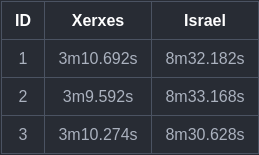
- After running the configure and make to build the project, we now have a functioning executable for gzip

- The test will be conducted on 2 separate architecture: x86-64 and AArch64 and the results are recorded as follow
B. O3 Optimization:
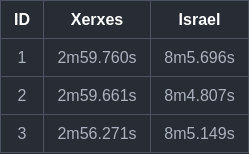
- After running the configure and make to build the project, we now have a functioning executable for gzip

- The test will be conducted on 2 separate architecture: x86-64 and AArch64 and the results are recorded as follow
III. Result:
- As can be seen from the above tables, the difference between the normal and O3 optimization is similar in both x86-64 and AArch64 architecture
- However, what really surprised me was the time gap between x86-64 and AArch64, the time needed to finish gzip operation on Israel server is 4 times longer than Xerxes
- To find the reason why there is such a big difference, I tried to view the size of the project on both servers because I suspected that the code for them might be different but the size is similar
- I believe one of the reasons a big difference exists is because the AARch64 is relatively new comparing to x86-64 so the optimizations for AArch64 have yet to be developed properly
- As the time needed to finish gzip changes when we change the optimization level, I believe that there won’t be many improvements can be made. On top of that, it seems like the developers also added some DEBUG flags for advanced users so there is a small chance I can improve it with my current knowledge
 SPO600
One thought on “Project: Gzip Building (updated)”